Showing posts with label time lapse. Show all posts

Sunday, October 26, 2014

Down Baker Street to Moriarty's Lair

Our recent rides have been centered around using the excellent new roads created off 155 main by our friendly outdoors-sharing logging company.  Paul and I took a round-about trip out that way today to see if we could navigate our newly-discovered trail that leads to Moriarty Lake, aptly named Baker Street, without running into TimberPest's gargantuan road blockage.  We walked it during our previous ride in that area and decided that it was quite do-able if the weather remained dry.  So we picked a nice soggy Sunday with lots of running water to attempt riding it.  :)  It was a terrific ride and a great success!

Here's the shape o' the day:
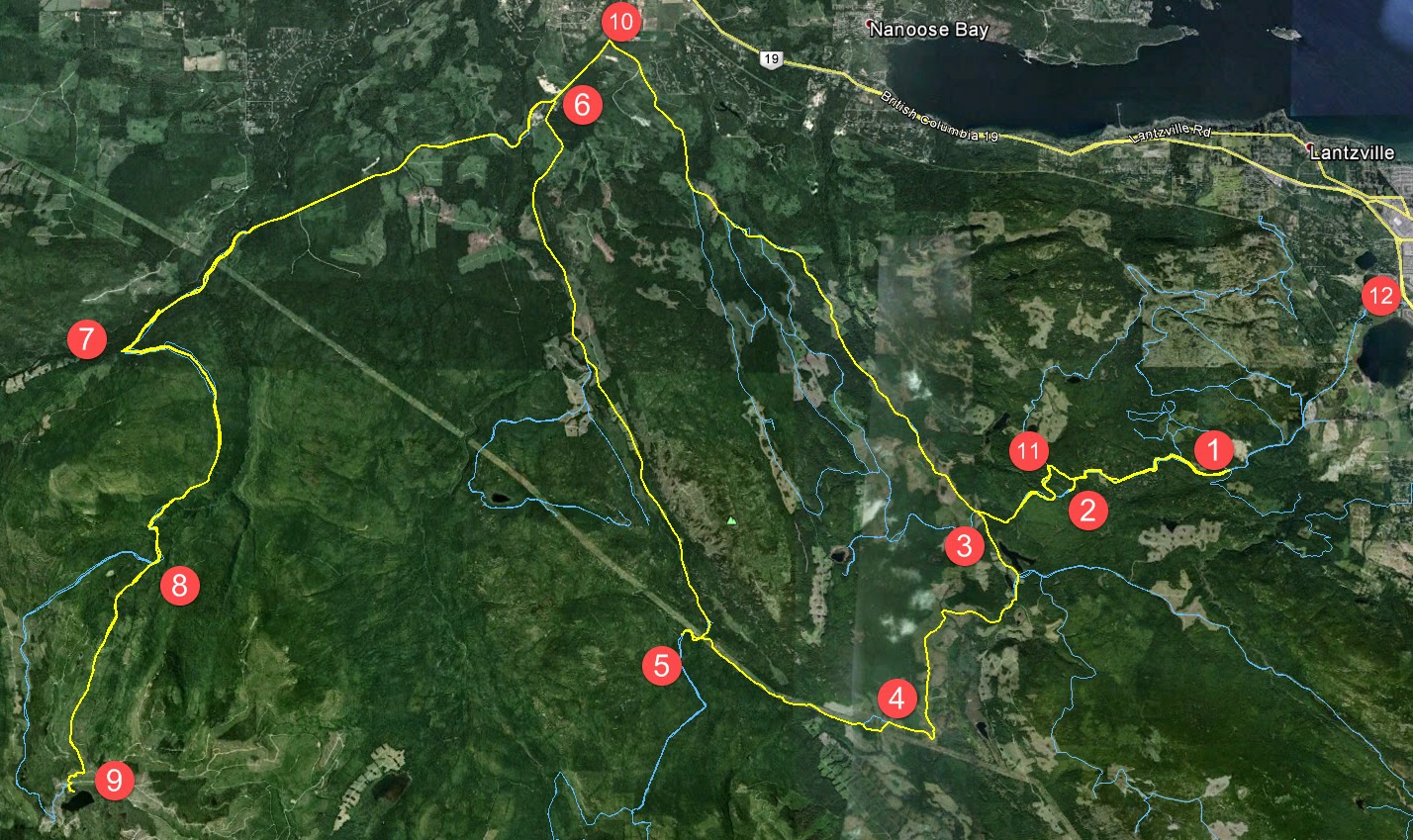

1.  Entered the logging roads at Weigles Road/Doumont
2.  Turned back at the "alternative tank traps" due to wind fall tree across the trail.  We need a quader in here with a chainsaw!
3.  Through the old tank traps, which is nicely cleared, and left turn on branch 142 towards Boomerang Lake.
4.  Turned right and joined the power line trail.
5.  Intended route towards the "hellevator" trail has turned into a pretty rapidly running river.  We decided to head towards 155 main and blast up our recently more regular route.
6.  Rode up Okay Mountain Valley, past the Rhododendron turning and turned left onto 155 main.
7.  Uphill left turn onto signposted 155-160
8.  Left onto connector trail to "Baker Street" (wikilocs track)
9.  Through the connector and right down Baker Street to the logging roads surrounding Moriarty Lake.  Took a quick visit to the Moriarty cabin where Paul was kind enough to share his British Rail type sandwich.  Actually it was very good! (Yes it was - judging by the way you inhaled it! - P)  Thanks mate.
10. Retraced route towards home.  Dumped the bike up Baker Street.  Darn you Moriarty!  Followed 155 main up to a right turn onto branch 142
11.  Back through the old tank traps.
12.  Black Bear Pub for a pint o' IPA and ESB!  Cheers!

Wind Fall timber across the trail through the alternative tank traps (2 on map above)


Colour Coded Altitude Track

New burned out (stolen?) truck appears on route to the Tank Traps on the Doumont side (shortly before 2 on map)

Washed out!  River running down the route towards the HeLLeVaToR (5 on map)

Approaching Moriarty Lake Cabin on foot

Moriarty Lake Cabin at 9

Moriarty Lake Cabin at 9

Moriarty Lake Cabin at 9

Moriarty Lake Cabin at 9 Pack your garbage out...please


Above: Real Time Vid of the "Highlights" of the route to Moriarty Lake.


Time Lapse: Turning off 155-160 onto connector leading to Moriarty Lake ("Baker Street")

 Time Lapse: Back up Baker Street connector trail towards 155-160

Time Lapse: Return trip from 155

 
Track Flyover on Google Earth

GPS Track Playback at 100x Speed


Here's a direct track from doumont to Lake Moriarty.  Use it in conjunction with this track of the connector (Baker St) to get right down to the lake.  The track for the entire route, exactly as it appears on this blog page, can be found here.


Saturday, August 16, 2014

Getting to the Back of Ammonite Falls (West Upper Side)

This was intended to be an addendum to my last post where I tried out a few iPod apps that I'm using to create time lapse videos of rides.  I thought I'd begin a new post because the directions to Ammonite Falls' west side might be useful for some visitors.  In addition, I get to plaster a new blog right on top of Paul's obviously superior time lapse creation below, crushing it and rendering it completely ineffective and impotent!

Many people hike in to see Ammonite Falls from it's east side, coming from the Jameson Rd. entrance where you can park at the road's end and hoof it along the foot trails.  Another way in begins off Weigles road, through a yellow gate very close to the Wastelands MX track.  This entrance will take you to what most consider to be the back of the falls on the west side.  You arrive at the top of the falls, rather than the bottom, where the Jameson Rd. trails take you.  After a short ride from the Weigles yellow gate, you need to park and hike the last few hundred yards to the falls.  If it's wet, be warned, the top of the falls are very slippery and there's nothing but nasty pointed rocks to catch you at the bottom!

Here's the GPS track and a quick overview "flyover" movie of the route:


Now, for the time lapse video using the app "Timelapse Camera HD"


I'm not sure I'm going to find the speed and clarity I'm after at this rate.  I'm waiting for Apple to update the iOS for my iPod, (ver 7.0), in the hope that I can go back to using my original app, although it was no real winner to begin with.  Just want to get the speed down.

[Edit, Aug 20th]  I managed to get an older version of Time Lapse running on my iPod.  (That's the original app I was using that I had more success with).  This is the only one of these apps that doesn't mind running close to real-time speeds.  It will allow you to choose the playback speed as low as 1x (normal playback), 2x, 3x etc, up to the usual supersonic, flower blooming speeds that the rest of them do so well.  The results are far better when played back at 4x or 5x because you can actually follow along and see where you're going!  My "auto white balance" was playing games with me on this next video.... Some dark patches.

So, here's the vid:  Almost the same footage as before, just a bit more footage at the end.


Still a bit clunky, but not bad for an app running on iPod.

Go Pro Studio...Take One & Two

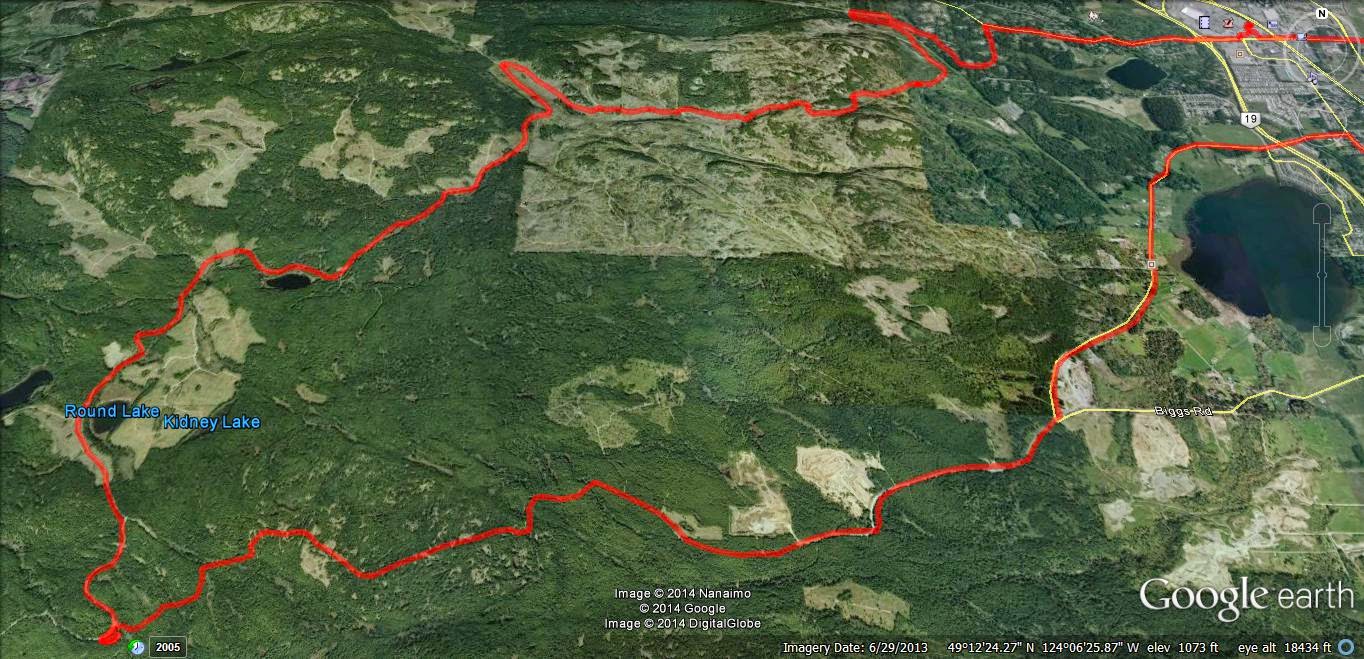
Usual loop, nothing new.  Phantom Road to Doumont Road via Kidney Lake...

Impressed as I am by Andy's time lapse video's via iPod App, I decided to produce a time-lapse video by stitching regular video (MP4) together and then speeding it up...  I am using a Coleman Conquest helmet cam which has the option of shooting in MP4 in HD 1080P @ 30fps and shooting continuously while saving files in 1 minute segments which fit together seamlessly when played back (it's called car mode). The advantage of this is that the files can be uploaded or edited quickly if you wish to cherry pick segments from them rather than sorting through one huge file (which you can do if you are glutton for punishment).  

So I downloaded Freemake Video and stitched 38 one minute MP4 files together, but stupidly checked the "transition" setting so they fade into each other.  I then further complicated things by downloading Go Pro Studio (Free & no malware) to take that single file and speed it up to 6 times speed.  So in all this file was converted from MP4, to as GSV file (a go pro tag), an AVI and then back to an MP4...  This may have impacted quality, so, for my second attempt, I did the same project again in Go Pro Studio only, to see if the quality is improved with as few conversions as possible.  

In Go Pro Studio you can select how many times you want to speed the video up from double speed to hundreds of times...I chose 6.  So I'm not sure how a 38 minute video was shrunk to 5m30...that's more like 7 or more times...  But it's free, and as me old (Step) dad used to say, "You get what you pay for..."

Attempt Two: Ok this was fun.  Go Pro Studio allows you to incorporate slow motion into the vid, controlling it via percentage (100% being normal speed), so I have incorporated a couple of sections of 50% and one of 25%.  Given this is a free program, I am very impressed with the flexibility and quality of the resulting product.  The downside is that it does take a long time to process the video - my 38 minute video compressed to a 7 minute video in about half an hour... 

To improve the quality, maximize the video, click settings and choose HD. Pretty darn good!  Oh, and there's a secret message at the end, but don't tell Andy.  Oh, and apologies for the music, but it is better than Andy's :)...Again - it was free...


The track for this ride can be found HERE.

[Edit, Aug 21st, Andy]
For a comparison, here's the same ride filmed in time lapse at 4x speed using an iPod and the app "TimeLapse."  The last minute is unedited.  Sorry--yes, too lazy to edit it properly. 


Riding to Kidney Lake: Some Time Lapse App Comparisons (iPod, iPhone and iPad)

So, yesterday my iPod decided that it didn't want anything to do with my time lapse movie app.  I tried everything I could think of to get them to make up and start cooperating with each other, but after completely re-conbobulating my iPod's memory and polishing it's norgon adapter plate module, the app still refused to even copy onto the device.  $4.99 down the pipe!  Time for a new app!

I downloaded five different time lapse aps from iTunes and then buckled down to begin an intense workout of filming trail rides using each one, (phffff).

Here they are... the little darlings:


1.  This was the one that I was using, "TimeLapse."  I really liked it before it decided to cause me so much grief.  It's easy to use, relatively quick when processing movies and the final product is very good.  I liked that this app allowed you to get really close to 1:1 speeds, so you could create well-detailed movies that were only slightly speeded up.  All the others do the cloud moving or flower opening thing, but this was perfect for filming rides and hikes without making them too fast.  BUT IT STOPPED WORKING ON MY IPOD!  Stupid app!

2.  "Time Lapse!"  Really liked this one when it ran on my iPad, but it also refused to even copy onto my iPod (4th gen).  What can I say...  I hate it.  It will take a frame each 1/2 second, which is pretty good for my uses, although the output movie runs a a bit too fast.  Entirely useless on my iPod though.

3.  "iLapse"  Who thought of THAT name?  It's right up there with ProLapse!  With that said, it's the best of the bunch so far.  Still only goes down to a frame every half second, which makes the final movie a bit too fast, but the interface is very friendly and intuitive. The processing, when movie crunching at the end, is a bit slow, although the quality is higher than most of the others.  I like it, but I'm still looking for one that will speed up the ride just a bit, rather than turn it into a Keystone Cops episode.  (This one is used in the example below).

4. "Timelapse Camera" is really clunky!  I must be honest, I haven't really given it much of a chance yet.  After pressing the wrong buttons fifty thousand times, I decided the design wasn't too friendly and moved on to the others.  I'll get back to you on this one after I've changed the air in my tires. [edit]  Okay, my bad...  this one is actually pretty good:  I've discovered that I can get the captures down to 1/4 second, which is the best so far.  The output can be reduced to about 15fps, giving you a finished movie that runs at around 6x speed.  That's perfect for showing rides and it's the best I've seen out of these apps so far.  I'll append an example movie from this app when I get a chance.  

5.  "Lapse It Pro"  is well promoted and I was led to believe, (like a sheep to slaughter), that this was the one for me.  Not so--the interface is friendly and it looks good, but I couldn't stop it from working like a camera program that just takes lots of pictures which it throws up on the screen to create a jumpy horror show movie.  Very jerky end product and not what I'm after.  Also, this thing makes a continuous shutter sound which I couldn't stop.  Great app if your torturing someone!

6.  "Quick Lapse HD" was fantastic for about twenty minutes, but all I get now is a black screen with a nice movie camera logo on it.  Very fancy while it lasted.  Needs to be much more robust than that.         
----------------------------------------------------------------------------

Alright, enough drivel.  Here is a time lapse movie of today's brief ride from Harwood Workaround to Kidney lake.  I used ProLapse., er... I mean iLapse:

output frame rate......... 30fps
take frame every..........  .5secs
total vid length.............  manual
total session duration...  manual

This is as slow as I can get this to run:  :(


Sunday, August 10, 2014

iPod Timelapse Nonsense: Doumont, Bonnell and Harwood

As you can see from the previous five excellent posts, The REAL Motorcycle Diaries and DR Siouxsie's Travels have joined forces.  Paul and I have decided to manage this page between us and to pool our resources since we often ride together anyway.  This way, you get to read my hard-hitting, straight-to-the-point riding facts while enjoying Paul's verbose clatter sometimes in the same post!  Speaking of verbose clatter, here's a mindless post that's sure to lull any reader into a deep sleep:


I've been playing around with timelapse videos on my ipod once again.  (The resolution is crap, especially after YouTube have taken their bite out of it, but it serves its purpose quite well).  I just set my bike up with a 12v/5v accessory plug in and I wanted to get out there and give it a whirl.  So, here's a video to further illustrate my last post "Two Doumont Gates that Lead to Bonnell Main (The Sundew Road)".  This video ride was identical to the previous post, except that I exited onto Harwood Dr., instead of returning to a Doumont gate, using a short and easily navigable workaround.  (The tracks for this ride, including the workaround, can be found here).

The Route:


1.  Entered through yellow gate off of Doumont Road
2.  Over the white bridge and next left up the hill
3.  Through the "Mud Pass" into the Lantzville Foothills
4.  U-turn at Bonnell Main
5.  Left towards alternate exit
6.  Exited onto Harwood Dr. using workaround.  (Harwood Dr. is very close to Phantom Rd., giving a couple of options in this area)

Here's the workaround at #6 above.  It has been posted on here before, but with all the recent blockages by Tim Berwest, I thought it would be good to show that it's still open.  (Go on Tim--do your worst.  You know you wanna). 


Now, the video you've ALL been waiting for.... *yawn*:


Sunday, June 24, 2012

Another Way into the Lantzville Foothills

Paul and I were going to head out towards Rhododendron Lake today and explore some of the roads we pass out that way.  Unfortunately he wrenched his back waving his English flag just as the winning Italian goal was scored.  ("Was that the ball going in off the post?"  "No it was Paul's back").  Next time Paul!  Really am sorry to hear about your back...  Honest! 

I decided instead to see if I could enter the Lantzville foothills from the entrance off of Aulds Rd/Old Logging Rd.  The entrance is well gated, but a small trail has been made 100m before the gate on the left.  I entered on this trail and so, I was unable to read the sign on the yellow gate.  It was probably some kind of "Welcome to the Lantzville Foothills," sort of thing.


 Here's today's route:


And... here's the day in brief:
 
1.  Entered through left trail off Old Logging Rd.  (Left turn off Aulds Rd.  See photo two above).
2.  Explored many of the Lantzville Foothills trails.  Great climbs!  Great wildlife from snakes to 1" baby  quails with FRANTIC parents.  Quite overgrown in some parts.
3.  Lantzville F.H. gate open again.
4.  Took a right off Bonnell Main that I've often passed.  It's the turn right before the road that goes to the NE side of Kidney Lake, (when heading SW).
5.  Quite overgrown towards the end.  Stopped at an extremely steep section and returned to 142.
6.  Out towards Boomerang Lake.  I had a plan to make GPS tracks of a couple of new roads out past the lake, but it started to rain.  I'm wanting at least five unrecorded roads to upload to my map provider, so I can get the next upgrade for free.  Next time, I guess!
7.  Stopped off at the open area just past the Doumont Trail's "tank traps" to see what's out there.  I never look in this area because usually I'm enroute to some other spot.  What a horror story:  It's a shotgun shell graveyard with targets of all types hanging off trees, logs and various other bits and pieces.  I left when two cowboys and a hot blonde arrived with a truck load of guns and a few full boxes of shells.  Good thing lead pellets are a thing of the past!  What bothers me about this spot most of all is the location of targets right next to a walking/cycling trail.   
8.  Zipped into the Nanaimo Motocross Assoc. to watch a few bikes fly over the track.  Really great!  Too bad the gate was locked shut when I tried to leave!  Five minute wait... no prob.

Up high in the foothills
Looking East towards Gabriola Island from high in the foothills
A small sample of the plethora of shotgun shell casings left near the Doumont Trail

The GPS track "walk through":


Google Earth "Flyover" of today's trails:
      

iPod Time lapse movie of some trails in the Lantzville Foothills:


So, we can ride the foothills without having to worry about a locked gate on the other side stopping us from getting out.  There's one short steeper section coming in from the "Aulds" entrance that might give a bit of grief going the other way.  Easy downhill in a loose packed clay coming in, but you'd need to belt up it pretty fast to get out without spinning the rear tire.  Probably do-able.

37.3km of logging roads today.

Westwood Lake Trail

I took a short ride out to the Westwood Lake Trail yesterday.  I tried reaching this trail some time ago from the NW end, off of Jingle Pot Rd.  It was winter time and the steep trails leading in were too slick to get down the hill from that side.  This time I entered from the Nanaimo Lakes Road end.... Much easier.

It's a nice little trail.  Nothing too exciting, but a fun, quick ride all the same.


Here's an iPod time lapse movie from the NW end back to the gate, (4x speed). Sorry about the bumps!


I'd like to try it again sometime.  It looks like it might go all the way through on Google Earth.

Monday, February 20, 2012

A Quick Ride... Doumont Tr., Okay Mt. & Sundew Gate

It was pretty good weather yesterday and I figured some of the ice and snow might have cleared up through the tank traps on the Doumont Trail entrance to the logging roads.  I headed out, made it through the traps traps and managed to get half way along the trail that skirts the east side of Okay Mountain.  I was eventually stopped by ice and snow as the altitude buggered things up for me and eventually I returned to the lower roads.  So... I headed off towards Round Lake and rode the routine route to Sundew Gate.  The gate is easily passable now that the quads have obliterated all the hard work the logging people went to in blocking the gate. :)   Here's an iPod time-lapse video from the Doumont Trail entrance, through the tank traps and up a new (active, dead end) logging road that has appeared near turn for Okay Mountain trail (eastern edge).  BTW, when old farts go riding in mud puddles, they always poke them with a stick to check the base!  Watch the video and you'll get what I mean:


Sunday, February 05, 2012

Another Cheesy Time-Lapse Movie

I decided to have another go at making a time-lapse movie today.  Galloway Gulch Trail seemed like a perfect choice; it's really local, it's below the snow line and I didn't get an accurate GPS track of it yet.  Here's the routes:

The red route (top to bottom) runs from Galloway Gulch Road to Jameson Rd.  The orange spur goes from the main trail up to a bivouac overlooking the Doumont area.  Surprisingly, both trails matched my earlier guesses of these routes quite accurately.
Here's a YouTube time-lapse video of the ride.  The movie starts at Allsop Rd (off Jingle Pot), runs the length of the Galloway Trail where it turns 180° at the yellow gate before turning left onto the bivouac spur trail.  Sure looks good on the even road surface, but the bouncing on the trails reduces the quality substantially.  The opening title is incorrect:  my iPod battery decided to cut the movie short!  In real time it's only about 40 min, and the total running time is only 2:30.  I can't believe the changes on this trail since the summer; they've logged the crap out of it!

 
Here are a couple of Garmin camera shots too:

The bivouac at the end of the orange trail
From the bivouac, looking out towards the Doumont Road area

Saturday, February 04, 2012

Cheesy Timelapse Video of the Doumont Trail

I've been waiting for weeks for the weather to clear up enough to head out for a ride.  A window appeared today after waiting hours for the fog to clear up, so I left for a ride up the Doumont Trail around 2:00pm.  I've been playing around with a $1.99 app on my iPod Touch called "Time Lapse" and I wanted to give it a whirl on the bike.  It works well in the car when it's pointed down a long stretch of road and when it's not being bounced around like a cocktail shaker, but on the trails it's going to be a different story I think.  The results weren't too great.

There's still a fair bit of snow and ice up there on Doumont.  I felt the rear wheel slip around quite a bit today and so I didn't go too far up the trail.  I turned a few hundred metres before the tank traps.  Come on springtime!

Here's the cheesy video: