Showing posts with label camera. Show all posts

Saturday, August 16, 2014

Getting to the Back of Ammonite Falls (West Upper Side)

This was intended to be an addendum to my last post where I tried out a few iPod apps that I'm using to create time lapse videos of rides.  I thought I'd begin a new post because the directions to Ammonite Falls' west side might be useful for some visitors.  In addition, I get to plaster a new blog right on top of Paul's obviously superior time lapse creation below, crushing it and rendering it completely ineffective and impotent!

Many people hike in to see Ammonite Falls from it's east side, coming from the Jameson Rd. entrance where you can park at the road's end and hoof it along the foot trails.  Another way in begins off Weigles road, through a yellow gate very close to the Wastelands MX track.  This entrance will take you to what most consider to be the back of the falls on the west side.  You arrive at the top of the falls, rather than the bottom, where the Jameson Rd. trails take you.  After a short ride from the Weigles yellow gate, you need to park and hike the last few hundred yards to the falls.  If it's wet, be warned, the top of the falls are very slippery and there's nothing but nasty pointed rocks to catch you at the bottom!

Here's the GPS track and a quick overview "flyover" movie of the route:


Now, for the time lapse video using the app "Timelapse Camera HD"


I'm not sure I'm going to find the speed and clarity I'm after at this rate.  I'm waiting for Apple to update the iOS for my iPod, (ver 7.0), in the hope that I can go back to using my original app, although it was no real winner to begin with.  Just want to get the speed down.

[Edit, Aug 20th]  I managed to get an older version of Time Lapse running on my iPod.  (That's the original app I was using that I had more success with).  This is the only one of these apps that doesn't mind running close to real-time speeds.  It will allow you to choose the playback speed as low as 1x (normal playback), 2x, 3x etc, up to the usual supersonic, flower blooming speeds that the rest of them do so well.  The results are far better when played back at 4x or 5x because you can actually follow along and see where you're going!  My "auto white balance" was playing games with me on this next video.... Some dark patches.

So, here's the vid:  Almost the same footage as before, just a bit more footage at the end.


Still a bit clunky, but not bad for an app running on iPod.

Go Pro Studio...Take One & Two

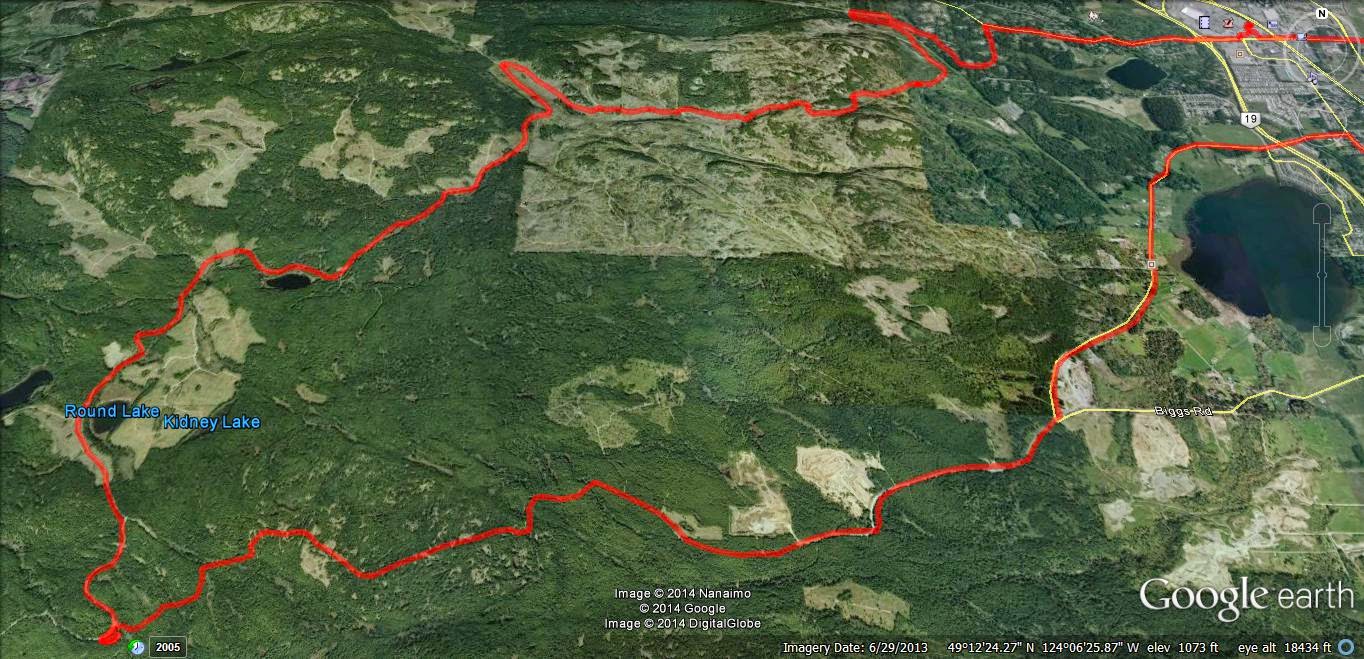
Usual loop, nothing new.  Phantom Road to Doumont Road via Kidney Lake...

Impressed as I am by Andy's time lapse video's via iPod App, I decided to produce a time-lapse video by stitching regular video (MP4) together and then speeding it up...  I am using a Coleman Conquest helmet cam which has the option of shooting in MP4 in HD 1080P @ 30fps and shooting continuously while saving files in 1 minute segments which fit together seamlessly when played back (it's called car mode). The advantage of this is that the files can be uploaded or edited quickly if you wish to cherry pick segments from them rather than sorting through one huge file (which you can do if you are glutton for punishment).  

So I downloaded Freemake Video and stitched 38 one minute MP4 files together, but stupidly checked the "transition" setting so they fade into each other.  I then further complicated things by downloading Go Pro Studio (Free & no malware) to take that single file and speed it up to 6 times speed.  So in all this file was converted from MP4, to as GSV file (a go pro tag), an AVI and then back to an MP4...  This may have impacted quality, so, for my second attempt, I did the same project again in Go Pro Studio only, to see if the quality is improved with as few conversions as possible.  

In Go Pro Studio you can select how many times you want to speed the video up from double speed to hundreds of times...I chose 6.  So I'm not sure how a 38 minute video was shrunk to 5m30...that's more like 7 or more times...  But it's free, and as me old (Step) dad used to say, "You get what you pay for..."

Attempt Two: Ok this was fun.  Go Pro Studio allows you to incorporate slow motion into the vid, controlling it via percentage (100% being normal speed), so I have incorporated a couple of sections of 50% and one of 25%.  Given this is a free program, I am very impressed with the flexibility and quality of the resulting product.  The downside is that it does take a long time to process the video - my 38 minute video compressed to a 7 minute video in about half an hour... 

To improve the quality, maximize the video, click settings and choose HD. Pretty darn good!  Oh, and there's a secret message at the end, but don't tell Andy.  Oh, and apologies for the music, but it is better than Andy's :)...Again - it was free...


The track for this ride can be found HERE.

[Edit, Aug 21st, Andy]
For a comparison, here's the same ride filmed in time lapse at 4x speed using an iPod and the app "TimeLapse."  The last minute is unedited.  Sorry--yes, too lazy to edit it properly. 


Riding to Kidney Lake: Some Time Lapse App Comparisons (iPod, iPhone and iPad)

So, yesterday my iPod decided that it didn't want anything to do with my time lapse movie app.  I tried everything I could think of to get them to make up and start cooperating with each other, but after completely re-conbobulating my iPod's memory and polishing it's norgon adapter plate module, the app still refused to even copy onto the device.  $4.99 down the pipe!  Time for a new app!

I downloaded five different time lapse aps from iTunes and then buckled down to begin an intense workout of filming trail rides using each one, (phffff).

Here they are... the little darlings:


1.  This was the one that I was using, "TimeLapse."  I really liked it before it decided to cause me so much grief.  It's easy to use, relatively quick when processing movies and the final product is very good.  I liked that this app allowed you to get really close to 1:1 speeds, so you could create well-detailed movies that were only slightly speeded up.  All the others do the cloud moving or flower opening thing, but this was perfect for filming rides and hikes without making them too fast.  BUT IT STOPPED WORKING ON MY IPOD!  Stupid app!

2.  "Time Lapse!"  Really liked this one when it ran on my iPad, but it also refused to even copy onto my iPod (4th gen).  What can I say...  I hate it.  It will take a frame each 1/2 second, which is pretty good for my uses, although the output movie runs a a bit too fast.  Entirely useless on my iPod though.

3.  "iLapse"  Who thought of THAT name?  It's right up there with ProLapse!  With that said, it's the best of the bunch so far.  Still only goes down to a frame every half second, which makes the final movie a bit too fast, but the interface is very friendly and intuitive. The processing, when movie crunching at the end, is a bit slow, although the quality is higher than most of the others.  I like it, but I'm still looking for one that will speed up the ride just a bit, rather than turn it into a Keystone Cops episode.  (This one is used in the example below).

4. "Timelapse Camera" is really clunky!  I must be honest, I haven't really given it much of a chance yet.  After pressing the wrong buttons fifty thousand times, I decided the design wasn't too friendly and moved on to the others.  I'll get back to you on this one after I've changed the air in my tires. [edit]  Okay, my bad...  this one is actually pretty good:  I've discovered that I can get the captures down to 1/4 second, which is the best so far.  The output can be reduced to about 15fps, giving you a finished movie that runs at around 6x speed.  That's perfect for showing rides and it's the best I've seen out of these apps so far.  I'll append an example movie from this app when I get a chance.  

5.  "Lapse It Pro"  is well promoted and I was led to believe, (like a sheep to slaughter), that this was the one for me.  Not so--the interface is friendly and it looks good, but I couldn't stop it from working like a camera program that just takes lots of pictures which it throws up on the screen to create a jumpy horror show movie.  Very jerky end product and not what I'm after.  Also, this thing makes a continuous shutter sound which I couldn't stop.  Great app if your torturing someone!

6.  "Quick Lapse HD" was fantastic for about twenty minutes, but all I get now is a black screen with a nice movie camera logo on it.  Very fancy while it lasted.  Needs to be much more robust than that.         
----------------------------------------------------------------------------

Alright, enough drivel.  Here is a time lapse movie of today's brief ride from Harwood Workaround to Kidney lake.  I used ProLapse., er... I mean iLapse:

output frame rate......... 30fps
take frame every..........  .5secs
total vid length.............  manual
total session duration...  manual

This is as slow as I can get this to run:  :(


Saturday, March 31, 2012

Okay Mountain... FAIL!

Tried to get up Okay Mountain again today.  This is one of four rides that I'm really keen to get at this summer, but it's too early yet...  I was skunked once again by fairly deep snow and a downed log.  I'm sure that it would be easy to get over that pesky log if it weren't for the snow around it!  Also, I heard a strange sound after stopping at the log that I could have sworn was a cougar...  Anyway, it spooked the shit out of me!  I revved the engine half a dozen times quite loudly to make as much noise as I could before turning back.  It was pretty clear that today's ride was going to be on more familiar roads.  I decided at one point to explore a few spur roads.  My Garmin decided to start turning off repeatedly once I got deep into unknown territory and ruined the fun completely.  Nothing like having an expensive tool that gets you deep into the woods and then decides to pack it in, expecting you to find your own way out.  Thanks Garmin!  I managed to find my own way back, but my sense of direction has never been that good.  I rely heavily on that GPS!

I recopied Garmin's firmware into my GPS and it stopped the constant turning off, but I'm not happy.  How can I trust a GPS that won't show you the way.  They get another chance and then I go to work getting a refund while producing "Garmin Sucks" YouTube videos .

Here's another nasty video of the Tank Traps section of Doumont Road, (real time).  This is the way heading out of our local logging roads.  Very bumpy!  The video actually makes me a bit motion sick because of the jumping about.  I think I need to body mount this camera somehow...  Right now it's in a bumbag around the headlight.


It POURED coming home and so I decided to give the bike a quick spray at the local car wash and spent ten minutes watching the rain come down in stair rods.  After deciding it wasn't stopping any time soon, I finally bit the bullet and rode home.  I've got stuff hanging up to dry everywhere.  :)

Fun ride, but I'm pretty cheesed off with Garmin!